
Budget & Cost Management System
Every figure has a name against it.
The governed financial record for capital projects and programmes, connecting estimate, approved budget, baseline, commitments, actual cost and forecast through earned value, cash flow, funding, change, cost risk, commercial claims and the approvals behind each movement.
Nine steps, and no way to skip one.
A spreadsheet lets a number appear without a history. BCMS does not: every figure arrives from the step before it, carrying who approved it, what they were allowed to approve, and what changed afterwards.
What the work is expected to cost, before anybody has committed to it.
Four questions a spreadsheet cannot answer.
Cost-control workbooks can perform arithmetic effectively. The weakness appears when a figure is challenged and its origin, approval history or relationship to the authorised baseline cannot be demonstrated. BCMS preserves that provenance.
- 0
- Report definitions
- 0
- Roles in the catalogue
- 0
- Governed datasets
- 0
- Role-targeted dashboards
Who may approve what, configured rather than coded.
Each financial decision, including a baseline, budget revision, transfer, contingency drawdown or commercial claim, follows a versioned workflow with defined subjects, stages and approval authorities. Changing an approval route is controlled configuration, not a software release.
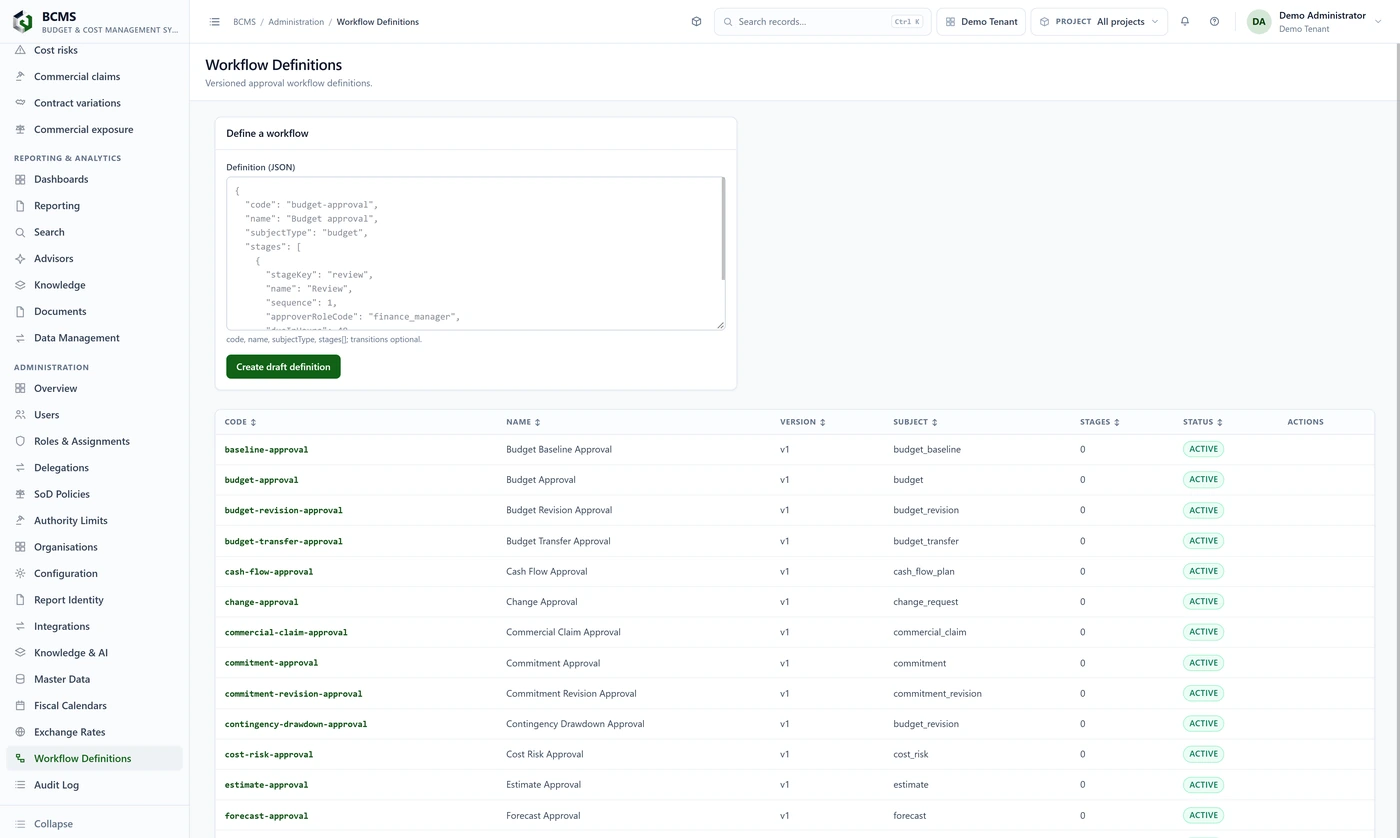
Each definition carries a version. An approval already given stays attached to the version it was given under.
- Five kinds of authority limitAuthority is a value as well as a role: what this person may approve, and up to what amount.
- Segregation of duties as policyThe combinations one person may never perform on the same record are recorded and enforced, not left to convention.
- Delegation is boundedPassing authority to somebody else is bounded in time and in value, and an expired delegation is surfaced rather than left active.
A complete system with nothing else bought.
BCMS carries a catalogue of optional connectors, every one of them disabled by default and every one plugging into a vendor-neutral port. With all of them switched off it operates completely. Nothing on this page depends on another Zemerc application existing.
- No external system is requiredA new connection uses the disabled adapter by default.
- Credentials never surfaceThey are resolved by the deployment at run time and are never displayed or returned through the application.
- The finance system stays authoritativeWhere an accounting record exists elsewhere, BCMS consumes it and stays authoritative for budgets, forecasts, change and commercial.
Six groups, taken from the application's own navigation.
Not a feature list written for a brochure. This is how the application is organised, and every page named here is a page a user opens.
Financial structure
The frame every figure is posted against: regions, programmes and projects, with the fiscal calendar and reporting currency that fix which period a posting lands in.
- Projects
- Programmes
- Regions
- Fiscal calendars
- Exchange rates
Cost management
The spine. Estimates become budgets, budgets carry baselines, commitments are raised against them, actual costs post, and none of it can be quietly rewritten afterwards.
- Estimates
- Estimate comparison
- Budgets
- Commitments
- Commitment exceptions
- Actual costs
- Accruals
- Project financials
- Period close
- Cost closeout
- Benchmarks
Performance and funding
What the project will cost by the time it finishes, and whether the money is there when it is needed. Earned value and its trend, forecasts and their comparison, cash flow, funding and payment milestones.
- Forecasts
- Forecast comparison
- EVM measurements
- EVM trend
- Cash flow plans
- Funding
- Payment milestones
- Liquidity alerts
Change, risk and commercial
The exposure that sits outside the approved budget: change awaiting decision, cost risk and contingency, claims and variations, and the commercial position they add up to.
- Changes
- Cost risks
- Commercial claims
- Contract variations
- Commercial exposure
Reporting and analytics
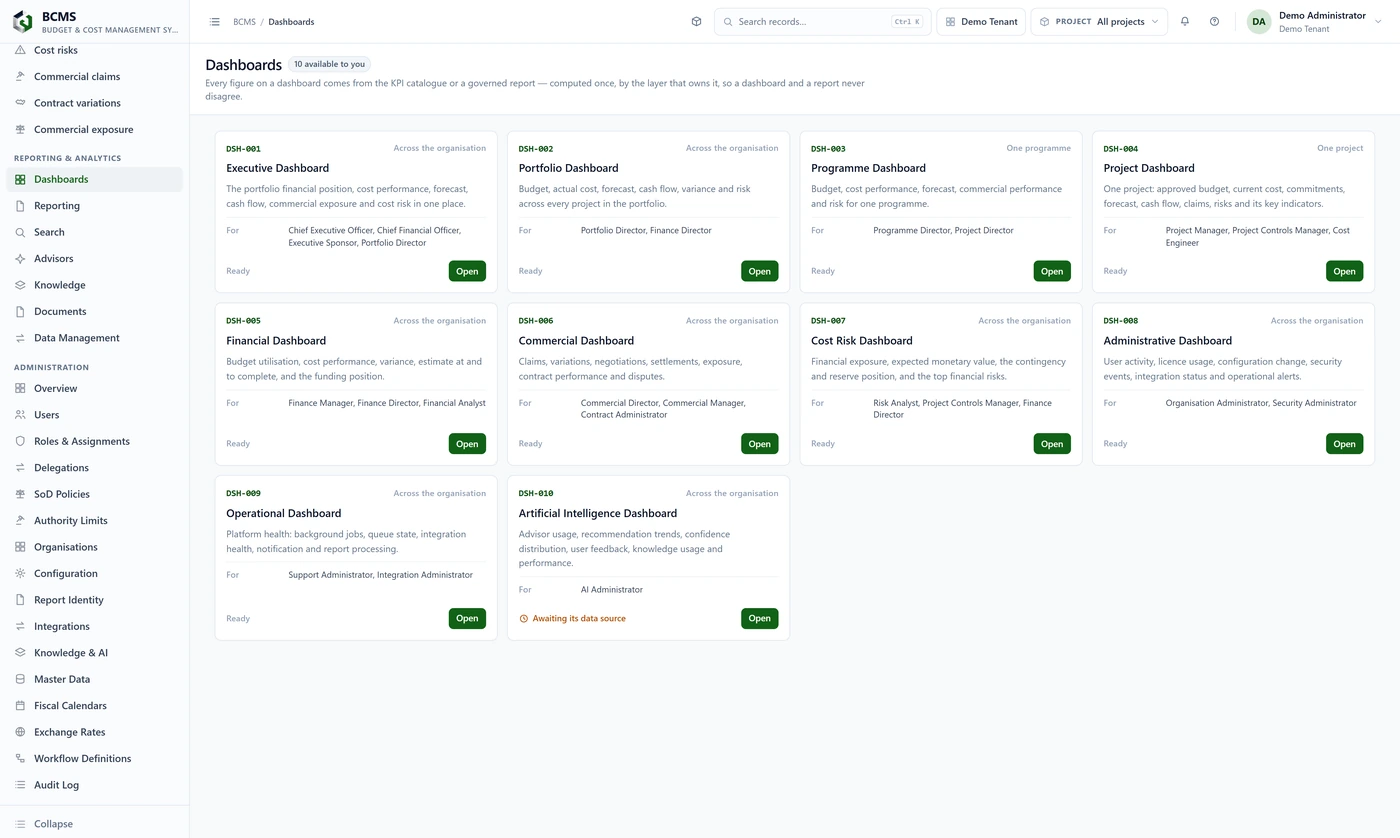
Eighty-five report definitions, ten role-targeted dashboards and the advisors that explain a figure without ever changing one.
- Dashboards
- Reporting
- Search
- Advisors
- Knowledge
- Documents
- Data Management
Administration
Who may approve what, to what value, and who may never do two things on the same record. Configured as data, versioned, and checked on the server rather than in the browser.
- Users
- Roles & Assignments
- Delegations
- SoD Policies
- Authority Limits
- Organisations
- Configuration
- Workflow Definitions
- Audit Log

The things an administrator would otherwise have to count.
People who can sign in and do nothing. Delegations whose authority lapsed but whose record was never tidied. Periods still open past their end date, which is how a late posting lands in the wrong month. The application counts them and puts them on the first screen.
- Roles, assignments and segregation-of-duties policies in one place
- Authority limits by role and by value
- A platform operator plane that cannot read organisation financial data
Posted means posted
A posted transaction cannot be edited. That is enforced by the database rather than by a rule somebody can forget, so the figure you read this month is the figure that was posted.
Authority is a value, not a title
Five kinds of authority limit say what each role may approve and up to what amount. The check runs on the server at the moment of approval, so a screen never grants a right.
Nobody approves their own work
Segregation of duties is configured as policy, not convention: the combinations of action one person may never perform on the same record are recorded and enforced.
The audit log only grows
Every approval, change and posting is appended. Nothing in the trail can be amended or removed, including by an administrator.
Thirty-two datasets, and it says which ones it will not take.
Every dataset exports. Eleven accept a file, eight round-trip cleanly, and where something is deliberately unavailable the application says why rather than failing quietly at the end of an import.

Three registers are governed by migration rather than by direct write: proposed by one person, released by another, and nothing written until it is.

The people who have to defend the number.
Cost engineers and controllers, quantity surveyors, project controls and planning teams, forecast analysts, commercial managers and contract administrators, together with the finance and programme leadership responsible for the resulting financial position.
- Thirty-four roles in the catalogue, in five groups
- External roles for client, contractor and auditor
- Read-only auditor access that changes nothing it looks at
More of what the application covers.
- Estimate comparison, so two estimates can be read against each other rather than opened side by side
- Commitment exceptions, which name the commitments that no longer agree with what they were raised against
- Accruals for cost incurred but not yet invoiced, kept apart from posted actuals
- Contingency drawdown as its own approval, so the reserve is never quietly absorbed
- Liquidity alerts against the funding position rather than against the budget
- Benchmarks written from completed projects and offered back into estimating
- Eight advisory functions compute the underlying result deterministically and use language generation only to explain the result. The calculations remain available when generative AI is disabled.
- Delegations bounded in time and value, with expired delegations surfaced rather than left active
- A platform operator plane that cannot read an organisation’s financial data
The financial record, beside the systems that create the commitments.
- PDMSPDMS: Project Delivery Management SystemPDMS governs project delivery and stage gates; BCMS governs budget, cost, commitment, actual and forecast.
- PMSPMS: Procurement Management SystemProcurement creates the purchasing commitment; BCMS governs the budget and financial commitment it consumes.
- CMSCMS: Contracts Management SystemCMS governs contractual obligations, claims and certification; BCMS carries the resulting cost and commercial exposure.
Bring one project’s cost report, and the spreadsheet behind it.
We will post the same figures through the chain and show you who approved each one, what they were allowed to approve, and what the audit trail says changed.